Applying a Claude writing skill
LLMs have a default house writing style with identifiable patterns: sentence fragments for emphasis, “not X, but Y” constructions, lots of hard contrast, atmospheric openings, heavy use of em dashes, and heavy use of marketing language. This reflects the semantic construction of an LLM. Custom instructions can override these defaults. A custom skill is a set of instructions within your account that modify how the model generates text. When you paste instructions into your profile settings, Claude reads them at the start of every conversation and adjusts its output accordingly.
I began using Claude daily for light writing tasks about six months ago, and over that time I started cataloging the patterns I was consistently editing out, including the terrible “not X, but Y” construction that showed up in nearly every response, and persistent em dashes used as all-purpose connectors when other punctuation is more appropriate.
I went through several iterations of bullying Claude into submission, narrowing the scope each time, before arriving at this version, which focuses specifically on writing mechanics and hard prohibitions.
You’ll need a paid Claude plan (Pro, Max, Team, or Enterprise). Free-tier accounts don’t have access to custom skills.
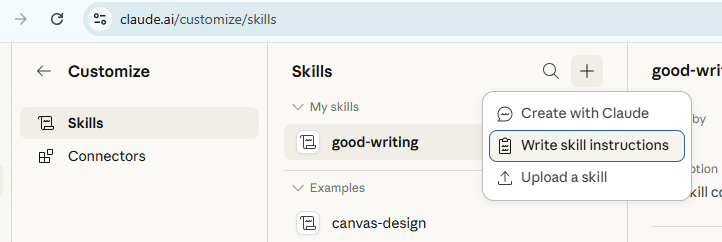
• Within the app, navigate to Customize > Skills and Create new skills
• Select add a new skill and Write skill instructions
• Copy and paste the copy from this file into the skill, making note of the name and description boxes. Feel free to tinker.
• Save your changes.
Note: The instructions in the linked file are Claude’s work, not mine. They came out of months of conversation, where Claude would analyze my style notes, and the file evolved from there. They read a little strangely because of that process. If I’d written them from scratch, they’d sound different. But looking at the file you can see what Claude responds to and how it works.
Claude will apply these instructions to every new conversation going forward. Existing conversations won’t pick up the change, so start a fresh chat to test it. If and when Claude struggles to apply the skill, call it out specifically in the prompt, such as, “Revise this for length using the good writing skill.”
The skill specifies constraints in a few categories and the instructions are plain text. As you go, you can also ask Claude to analyze previous conversations for suggested additions to the skill, which Claude will produce and implement within the chat. Each rule operates independently, so removing one doesn’t affect the others.
Claude processes custom instructions at the start of every conversation, before it generates any output. The instructions function as constraints on the model’s default behavior. The model doesn’t always follow every instruction perfectly and the results vary by task. You will still need to edit.